
Partner Icon
Become a Refrens PartnerLearn More

Automate Invoicing, Inventory, and Sales Workflows With Refrens API

Integrate Refrens API with your website, app, ERP, marketplace, or internal system. Automate invoice creation, synchronize inventory operations, and create or update leads without repetitive data entry.

Online Invoice API - Invoice Generator API
150k+ businesses across 170+ countries use Refrens for simplified invoicing

Choose the Refrens API That Fits Your Workflow

Automate document creation, GST e-invoicing, inventory operations, and lead management from the systems your business already uses.

Invoicing APIs

Create, retrieve, update, and cancel invoices from your website, app, ERP, marketplace, or internal system.

Explore Invoicing APIs →

E-Invoicing APIs

Generate an IRN and receive e-invoice details, a signed invoice, and a signed QR code for GST e-invoicing.

Explore E-Invoicing APIs →

Refrens APIs

Connect external systems with the business workflows managed inside Refrens.

●   Ready for automation

Inventory APIs

Create and manage inventory items, find transactions, adjust stock, and transfer stock between warehouses.

Explore Inventory APIs →

Sales CRM APIs

Create and update leads, connect clients and contacts, assign team members, and map pipelines and stages.

Explore Sales CRM APIs →

Keep Your Existing Systems. Automate the Work Between Them.

Keep invoicing, GST e-invoicing, inventory, and lead data moving through supported workflows.

Invoice Workflows Create and manage invoices from external systems.
GST E-Invoicing Generate IRNs, signed invoices, and signed QR codes.
Stock Movements Manage adjustments and warehouse transfers.
Lead Data Create, assign, and update leads from external systems.

Build the Workflow Your Business Needs

Explore the capabilities and supported workflows available across Refrens APIs.
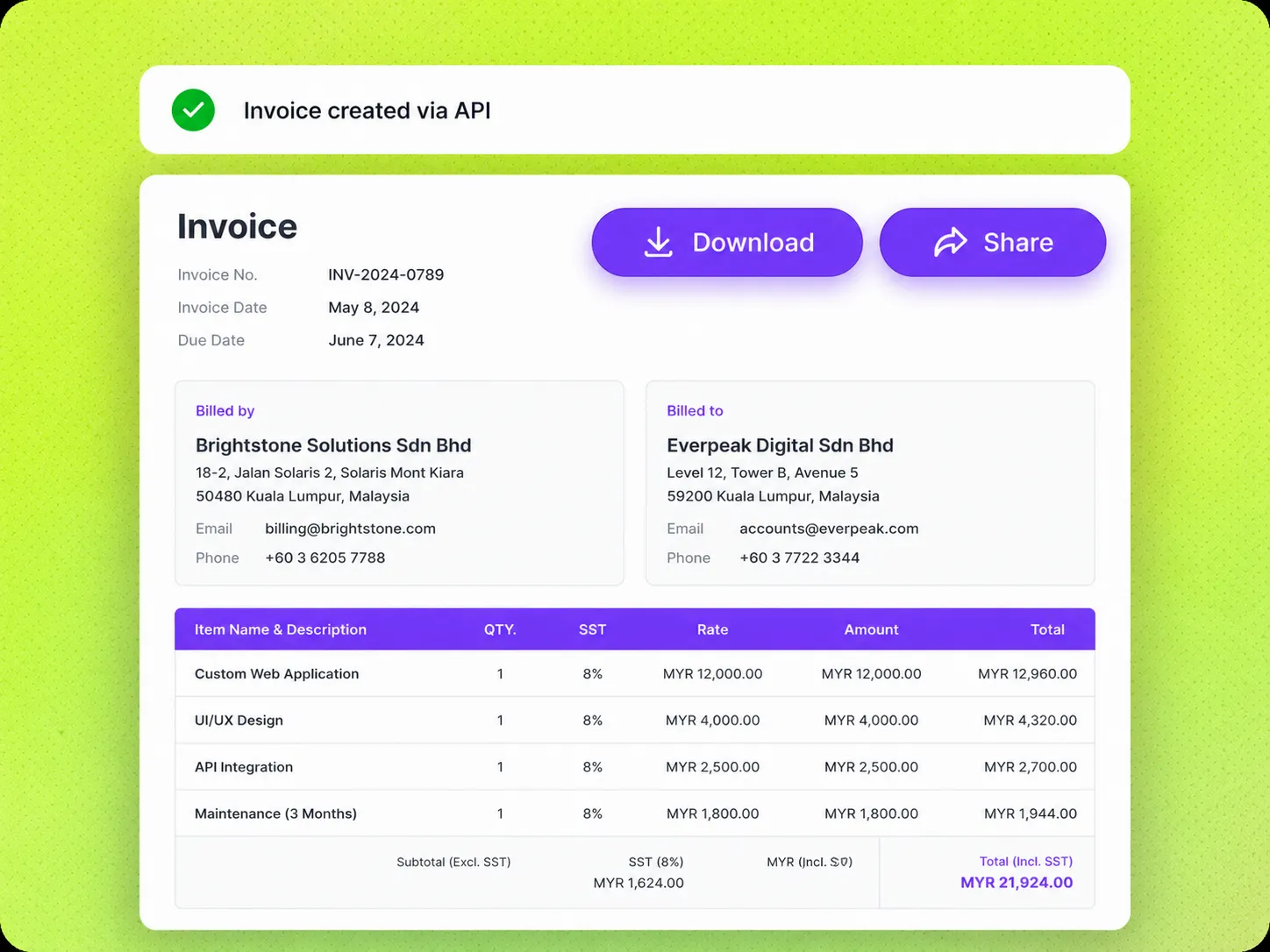
Refrens Invoicing API workflow

Automate Invoicing Across Business Workflows

Create, retrieve, update, share, and cancel invoices from your website, application, ERP, marketplace, or internal system.

Create invoices
Find and retrieve invoices
Generate PDF and view links
Email invoices
Record and retrieve payments
Update or cancel invoices
View Invoicing API Docs

Create Invoices

Create invoices with supported invoice, contact, item, tax, currency, due date, and payment details.

Share Links and PDFs

Use the invoice view link and PDF link returned with the invoice response.

Email Invoices

Send invoices to customers through the supported email workflow.

Record Payments

Add invoice payments with the amount, date, payment method, reference ID, and notes.
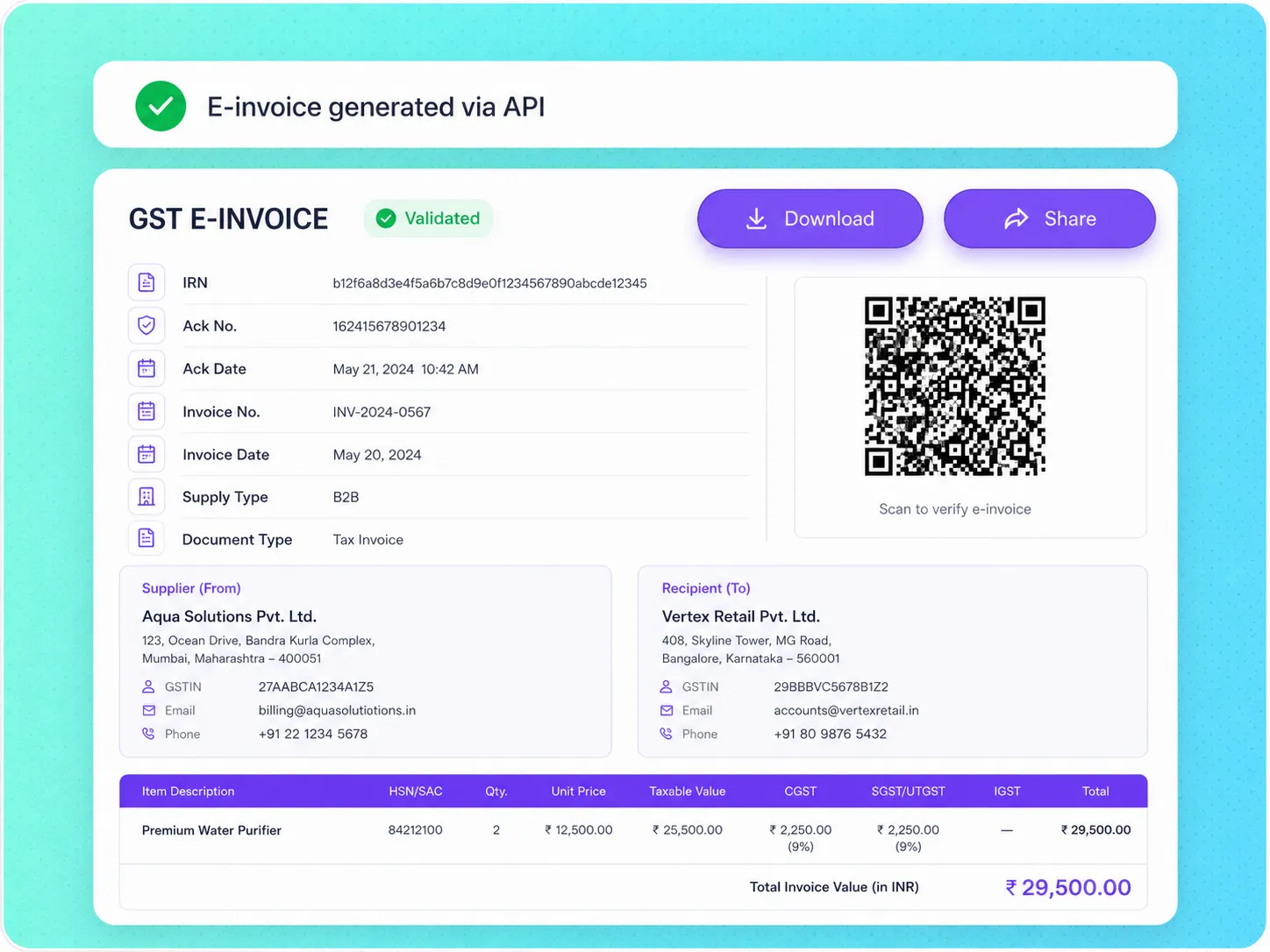
Refrens E-Invoicing API workflow

Add GST E-Invoicing to Your Billing Workflow

Generate an Invoice Reference Number for an existing Refrens invoice and retrieve the related e-invoice response.

Generate an IRN
Use an existing Refrens invoice
Retrieve e-invoice details
Retrieve the signed invoice
Retrieve the signed QR code
Pass supported payment details
View E-Invoicing API Docs

Use an Existing Invoice

Generate an e-invoice for an invoice already created in Refrens.

Generate an IRN

Generate the Invoice Reference Number through the supported API request.

Retrieve the Signed Invoice

Receive the signed invoice returned after successful e-invoice generation.

Retrieve the Signed QR Code

Receive the signed QR code returned with the e-invoice details.
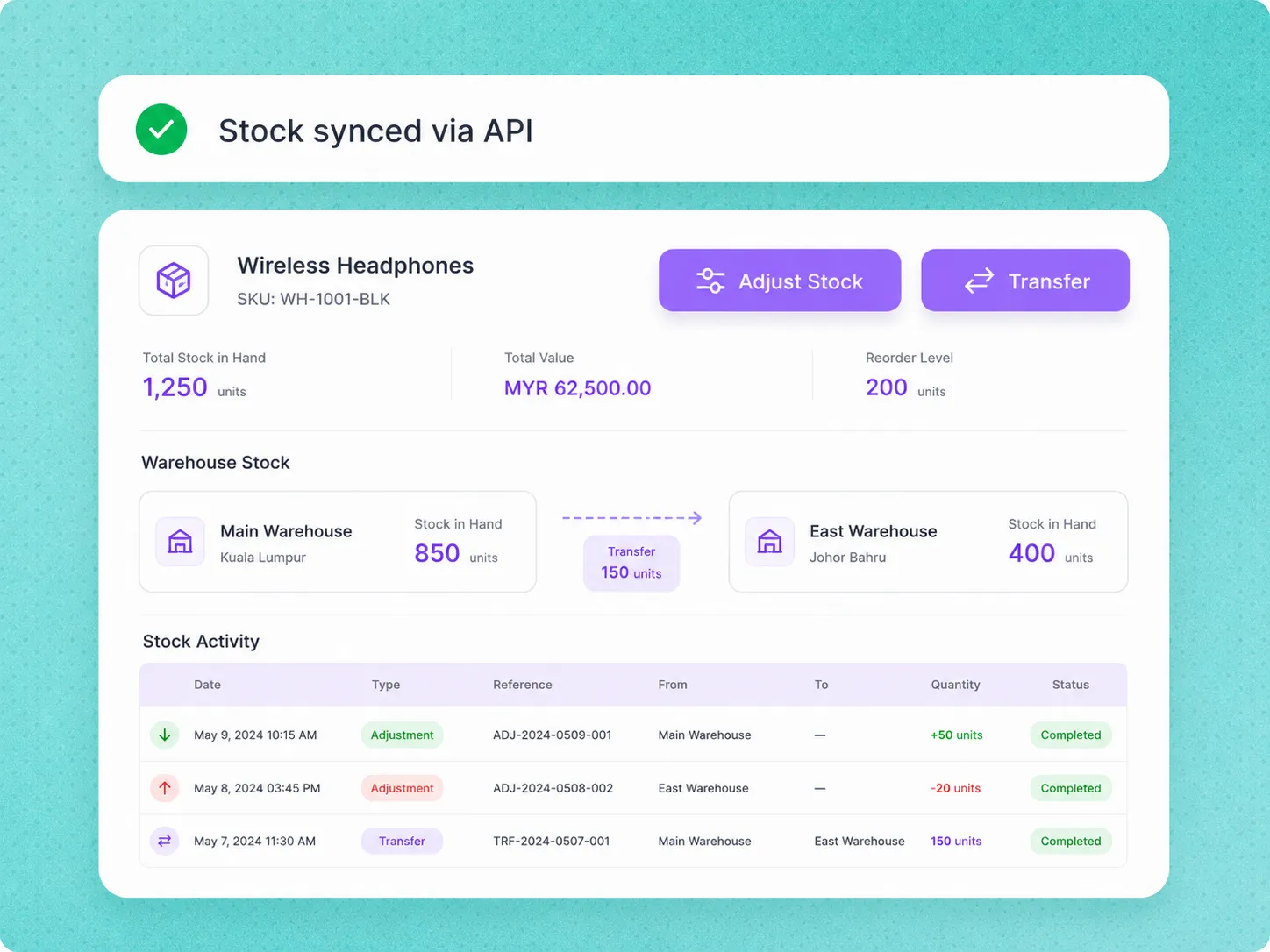
Refrens Inventory API workflow

Manage Inventory Items and Stock Movements

Create and manage inventory items, find inventory transactions, adjust stock, and transfer stock between warehouses.

Create inventory items
Find inventory items
Update inventory items
Find inventory transactions
Adjust stock
Transfer stock
View Inventory API Docs

Manage Inventory Items

Create, find, and update inventory items through the supported APIs.

Find Inventory Transactions

Find transactions using supported filters such as SKU, date, document type, warehouse, client, and transaction type.

Adjust Stock

Manually increase or decrease stock through the supported stock adjustment workflow.

Transfer Stock

Transfer stock between warehouses and record the movement in Refrens.
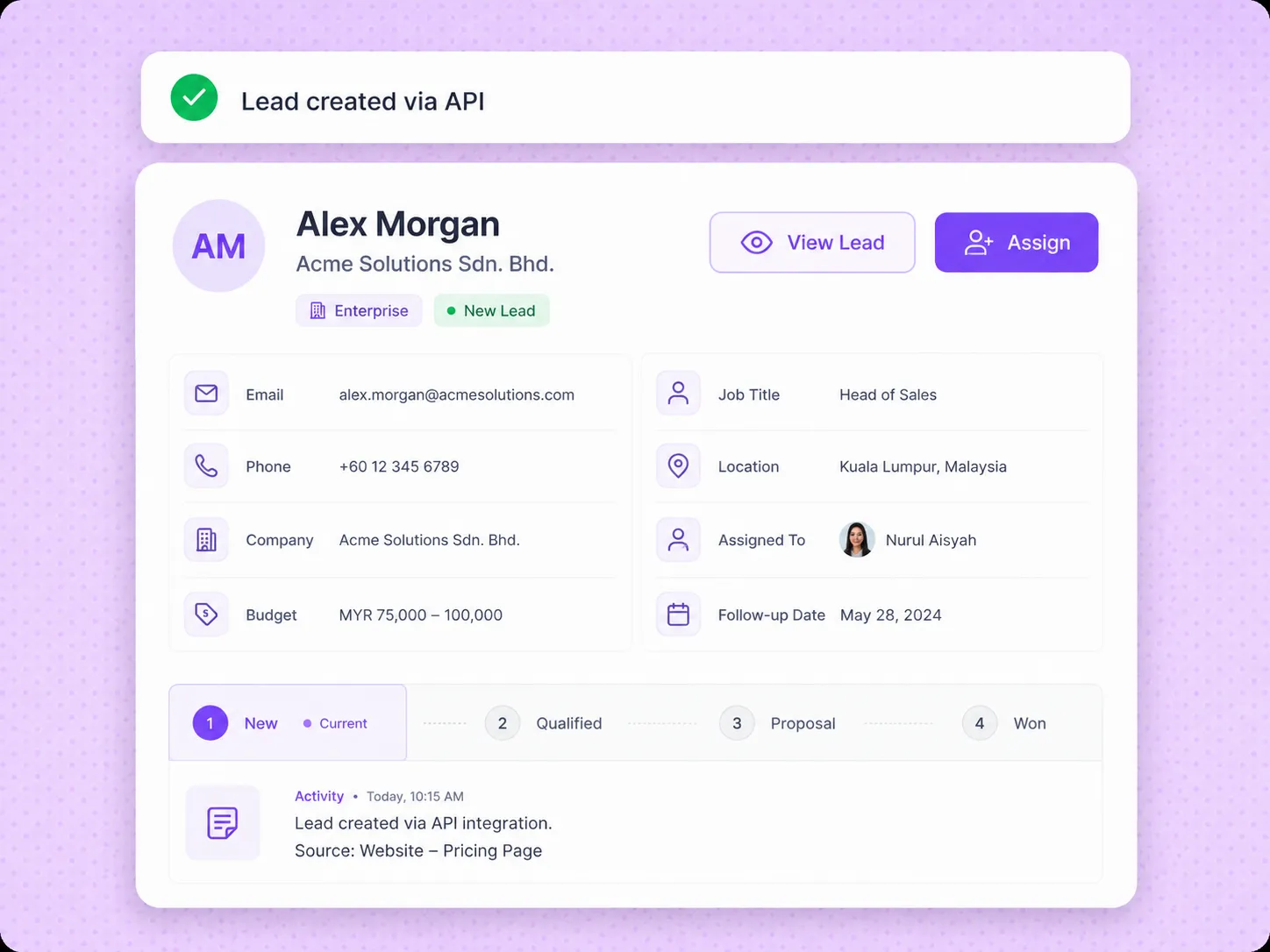
Refrens Sales CRM API workflow

Push and Update Leads From External Systems

Create and update leads, connect clients and contacts, assign team members, map pipelines and stages, and update supported lead information.

Create and update leads
Connect clients and contacts
Assign team members
Map pipelines and stages
Update sources and tags
Update supported lead details
View Sales CRM API Docs

Create and Update Leads

Create new leads or update existing leads from an external system.

Connect Clients and Contacts

Connect supported client and contact information with the lead.

Map Pipelines and Stages

Place leads in the supported pipeline and stage during creation or update.

Assign and Organise Leads

Assign team members and update supported sources, tags, budgets, notes, comments, and custom fields.

Connect Refrens Where Your Leads, Orders, and Business Data Already Are

Explore API Documentation

Automate invoicing from websites and applications

Create, retrieve, update, share, and cancel invoices using supported details sent from your website, application, ERP, marketplace, or internal system.

Invoicing APIs →

Generate GST e-invoices

Generate an Invoice Reference Number for an existing Refrens invoice and retrieve the related signed invoice and signed QR code.

E-Invoicing APIs →

Manage inventory items and stock movements

Create and manage inventory items, find inventory transactions, adjust stock, and transfer stock between warehouses.

Inventory APIs →

Create and update leads from external systems

Create and update leads, connect clients and contacts, assign team members, map pipelines and stages, and update supported lead information.

Sales CRM APIs →

Automate Shopify order invoicing

Use the Refrens Shopify app to create invoices from Shopify orders and record related billing actions in Refrens.

Shopify App →

Connect supported third-party applications

Use Pabbly Connect to connect Refrens with supported applications and automate supported invoicing workflows.

Integrations →

Everything You Need to Start Using Refrens APIs

Review available endpoints, authentication requirements, request parameters, response formats, and HTTP response codes in the Refrens API documentation.

API Documentation

Explore documented endpoints for creating and retrieving supported resources across Refrens APIs.

View documentation →

Authentication

Review how to obtain or self-sign a JWT token and pass it through the Authorization header for supported endpoints.

View authentication →

Request and Response Details

Review path parameters, query parameters, headers, request bodies, JSON responses, and documented success and error codes.

View example →

API Access and Support

API access must be enabled for your Refrens business. Contact Refrens support to enable access for an eligible account.

Get started →
Explore API Documentation

Invoice API trusted by...

Upgrad
Holidify
Mailmodo
ClaimBuddy
Superfone
pazcare
Swift

Backed by the smartest investors in the room

Vijay Shekar Sharma - PayTm
Vijay Shekhar SharmaFounder, Paytm
Kunal Shah - CRED
Kunal ShahFounder, CRED
Anupam Mittal - Shaadi.com
Anupam MittalFounder, Shaadi.com
Founders of IndiaMART, Park+, Cashfree, AngelList and many more.

Frequently Asked Questions (FAQ)

We offer a free trial for all our users to try out all our premium features. If you wish to upgrade the account or create invoices via API, a fee is charged.

Yes, you can migrate anytime. You can export all your invoices, quotations, proforma invoices and other such documents in CSV format which can be used to import on other software or tool.

Refrens is always available to support our customers via email support(care@refrens.com), live chat support, and also over phone call and WhatsApp (+91 9104043036).

Yes. Your data is stored securely with encryption and cloud protection. We are ISO/IEC 27001:2022 certified. Your data stays private and is safely stored on the cloud.

Please ping us on chat support with your name, email and phone number details, we will get back to you. Or email us at care@refrens.com


Transforming Your Invoicing Process with Invoice APIs

In today's digital landscape, businesses are continually seeking innovative solutions to streamline operations, enhance efficiency, and boost profitability. One critical area ripe for transformation is invoicing. Traditional invoicing processes are often manual, time-consuming, and prone to errors, impacting both cash flow and customer satisfaction.

Enter Refrens Invoice API—a powerful tool designed to revolutionize how businesses create, manage, and send invoices, turning a cumbersome task into a seamless, automated workflow.

What is an Invoice API?

An Invoice API is a set of programming instructions that allows software applications to communicate and perform invoicing tasks automatically.

The Refrens Invoice API enables developers to integrate robust invoicing functionalities directly into their business applications, websites, or e-commerce platforms. This integration eliminates manual data entry, reduces errors, and accelerates the invoicing process.

Key Features of Refrens Invoice API

  • Highly Secure and Reliable: Trust is paramount when handling financial data. Refrens ensures top-notch security and zero downtime, so your invoicing process is always up and running.
  • Developer-Friendly Documentation: Get started quickly with comprehensive guides and support, making integration a breeze.
  • Automated Invoice Generation and Sharing: Create and send invoices within seconds, improving efficiency and cash flow.
  • Real-Time Tracking: Know when invoices are opened, enhancing follow-up strategies and payment cycles.
  • Customizable Templates: Maintain brand consistency with customizable invoice designs.
  • Live Support: Access quick support via email, call, WhatsApp, or live chat whenever you need assistance.

The Rise of GST Invoice API

For businesses operating within regions that require compliance with Goods and Services Tax (GST), managing tax compliance is a significant concern. The GST Invoice API is a specialized subset that not only automates invoice creation but also ensures that invoices are compliant with GST regulations. It simplifies the complexities involved in calculating tax rates, tax amounts, and generating tax-compliant invoice formats, making it an invaluable tool for businesses looking to streamline their GST invoicing process.

Shopify Invoice API: Tailored for E-commerce

Shopify, one of the leading e-commerce platforms, offers its own Invoice API, allowing merchants to create, send, and manage invoices directly within the Shopify ecosystem. The Shopify Invoice API is designed to cater to the unique needs of online retailers, providing a seamless integration with the Shopify store and enabling automated invoice generation upon order placement. This not only enhances operational efficiency but also improves the customer experience by ensuring timely and accurate billing.

Refrens Integrations with Third-Party Platforms via Pabbly Connect

Connecting Refrens with your favorite third-party applications is now effortless with Pabbly Connect integration. Automate workflows and tasks to enhance productivity.

What You Can Do

  • Create Invoices Automatically: Generate invoices when you receive an order on your e-commerce store.
  • Edit Documents: Update invoices or other documents based on triggers from other services.
  • Email Invoices: Automatically send invoices when payments are received through gateways like Razorpay or Stripe.
  • Mark Invoices as Paid: Sync payment statuses automatically, reducing manual tracking.
  • Manage Cancellations and Refunds: Automate invoice cancellations or refunds for product returns.

Benefits of Pabbly Connect Integration

  • Streamlined Operations: Automate repetitive tasks, saving time and reducing errors.
  • Improved Accuracy: Ensure data consistency across platforms.
  • Enhanced Efficiency: Focus on strategic tasks by automating invoicing workflows

Benefits of Implementing an Invoice API

The advantages of integrating an Invoice API into your business operations are manifold:

1. Efficiency and Time Savings: Automation reduces the time spent on manual invoice processing, allowing businesses to allocate resources to more strategic tasks.

2. Accuracy and Reduced Errors: By minimizing manual data entry, the chances of errors are significantly reduced, leading to more accurate billing and fewer disputes.

3. Improved Cash Flow: Faster invoicing can lead to quicker payments, improving the business's cash flow.

4. Scalability: As your business grows, an Invoice API can easily handle an increasing volume of transactions without the need for additional resources.

5. Compliance: For businesses subject to specific tax regulations, like GST, specialized APIs ensure that invoices are always compliant, reducing the risk of penalties.

Choosing the Right Invoice API

When selecting an Invoice API, consider the following factors:

1. Integration: Ensure the API integrates seamlessly with your existing systems and workflows.

2. Customization: Look for an API that offers customizable invoice templates to match your brand.

3. Security: Choose an API that provides robust security features to protect sensitive financial data.

4. Support: Consider the level of support and documentation provided to facilitate a smooth integration process.

In the quest for operational efficiency and compliance, an Invoice API stands out as a key tool for businesses across various sectors. Whether you're in need of a GST Invoice API to comply with tax regulations or seeking a solution like the Shopify Invoice API to enhance your e-commerce operations, the right Invoice API can significantly transform your invoicing process. By automating and streamlining billing operations, businesses can focus on growth and innovation, leaving the complexities of invoicing to their chosen API solution.

Company
Payment Options


Made with and in Bengaluru.

Refrens Internet Pvt. Ltd. | All Rights Reserved
This site is protected by reCAPTCHA and the Google Privacy Policy and Terms of Service apply.
Refrens ISO Certificate